


The scripts were last checked and updated on October 17, 2026.
Welcome To Bloxburg is a popular Roblox experience where you live a virtual life in a bustling city. You can build and furnish your house, work jobs to earn money, and interact with others to create the lifestyle you want.
However, repetitive tasks like these can make the gameplay boring, and that’s where scripts come in. A Welcome To Bloxburg script gives you powerful tools like Auto Farm, Auto Build, and Teleport. So, below we’ve added the top Welcome To Bloxburg scripts for you.
All Welcome To Bloxburg Scripts

Welcome To Bloxburg Script – Auto Farm Undetected
loadstring(game:HttpGet("https://raw.githubusercontent.com/JonnyCheeser/rbw4/main/JonnyCheeseHub"))()This script automates resource collection and farming tasks to level up quickly in Welcome To Bloxburg.
| Feature | Effect |
|---|---|
| Auto Farm | Continuously gathers resources, items, or currency automatically. |
Welcome To Bloxburg Script – Teleports, Auto Farm & More Undetected
loadstring(game:HttpGet("https://bloxburger.eu/scripts/free/script.lua"))()This script adds teleportation, auto-farming, and other automation features for faster progress in Welcome To Bloxburg.
| Feature | Effect |
|---|---|
| Teleport | Instantly moves to preset locations, players, or objectives. |
| Auto Farm | Automatically gathers resources efficiently. |
Welcome To Bloxburg Script – Auto Farm Cash, Anti Fog, Set Time Undetected
loadstring(game:HttpGet("https://projectevo.xyz/v4/script.lua", true))()This script helps you farm in-game cash automatically, remove fog for better visibility, and set the time instantly.
| Feature | Effect |
|---|---|
| Auto Farm Cash | Collects in-game money automatically. |
| Anti Fog | Removes or reduces fog effects for clearer vision. |
| Set Time | Changes in-game time instantly to your preference. |
Welcome To Bloxburg Script – Autobuild, Autofarm, Fake Pay Check Undetected
loadstring(game:HttpGet('https://scripts.luawl.com/hosted/3491/19031/AzureTier1|FreeVer.lua'))()This script automates building, resource farming, and simulates paychecks for efficient gameplay without manual effort.
| Feature | Effect |
|---|---|
| Autobuild | Automatically constructs buildings and places items. |
| Autofarm | Automatically gathers resources and currency. |
| Fake Pay Check | Simulates earning income while idle. |
What Is A Welcome To Bloxburg Script
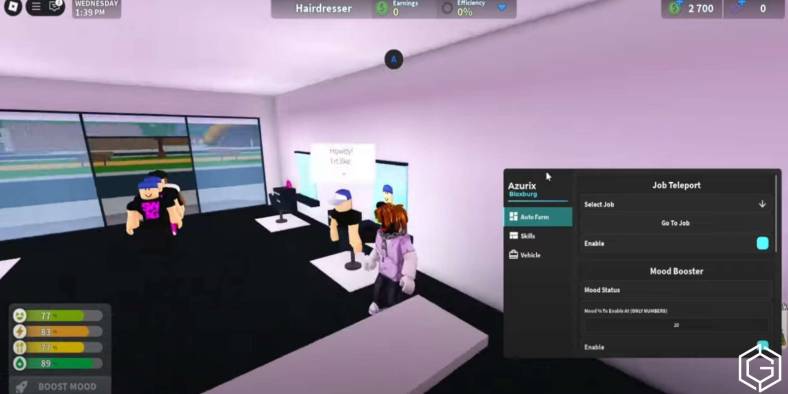
A Welcome To Bloxburg script is a Lua-based code that gives you powerful features inside the experience. You will get access to a custom GUI that includes options like Auto Farm, Auto Build, Teleport, and more.
Once you activate the script using an executor, it will do all the hard work for you. However, to avoid getting banned, you should use these scripts in private servers only and never abuse them in public matches.
Key Features Of Welcome To Bloxburg Script
| Feature | Description |
|---|---|
| Auto Farm | Continuously gathers resources, items, or currency so you progress without manual grinding. |
| Auto Build | Automatically places and constructs structures or items according to presets you set. |
| Teleport | Lets you instantly move to preset locations, players, or objectives on the map. |
| Auto Farm Cash | Specifically targets and collects in-game cash automatically for faster spending power. |
| Anti Fog | Removes or reduces fog effects so you get clear vision across the map. |
| Set Time | Changes the in-game time of day to your preferred setting immediately. |
| Fake Pay Check | Simulates collecting paychecks or income while you appear idle to others. |
How To Use Welcome To Bloxburg Scripts
You can use Welcome To Bloxburg scripts just by following these steps carefully. You need to install a safe executor like Delta, Synapse X, KRNL, or Fluxus. After setup, simply launch Roblox and join the Welcome To Bloxburg experience.
Then, you need to inject the executor, paste your chosen script, and hit “Execute.” Everything will work automatically from there. Here is a quick step-by-step guide:
| Step | Instruction |
|---|---|
| 1. Download Executor | Use Synapse X, KRNL, or Fluxus. Disable antivirus if it blocks the tool. |
| 2. Install & Set Up | Complete the installation and unlock with a key if required. |
| 3. Join A Server | Load into the Roblox Welcome To Bloxburg experience. |
| 4. Inject Executor | Press “Inject” to link the executor with Roblox. |
| 5. Paste Script | Copy and paste a trusted Welcome To Bloxburg script into the executor window. |
| 6. Execute | Click “Execute” to activate the script instantly in your game. |
If Roblox’s anti-exploit system flags you using a Welcome To Bloxburg Script, you could face a temporary ban.
Frequently Asked Questions (FAQs)
Yes. Auto Farm Cash collects in-game money automatically so you earn without working manually. Use it in private servers to avoid detection.
Yes. Auto Build places items and constructs buildings quickly using your presets. You do not need to build manually.
Yes. Teleport takes you to preset locations, other players, or objectives immediately. Avoid using it in public servers to prevent reports or bans.
Yes. Set Time changes the in-game time to your preferred setting right away. You can control it during any time in day, night, or evening.
Yes. Fake Pay Check simulates earning paychecks automatically while you appear idle. You do not need to stay at a job manually.
Check out Weak Legacy 2 Script: Auto Farm, Auto Attack, Auto Skills or Fisch: How to Get Magic Mirror for more on Game Geek Fusion!

Roblox
Sandbox, MMO, Social

