


Script Info
Updated on October 3, 2026
Verified and added 16 new scripts to the list. These scripts automate the game’s most time-consuming tasks through Auto Farm, Auto Shake, Auto Click, Instant Catch, and more. All scripts are working as of October 3, 2026.
Fisch is a popular Roblox experience where you can catch fish and sell them to become rich. However, catching fish repeatedly and selling them can get boring in Fisch, and that’s where scripts come in.
Using Fisch Script gives you huge advantages like auto fish, auto sell, teleport, auto reel, auto cast, and more. So, here’s a complete guide to the top Fisch Scripts, how to use them, and which features they unlock to give you an edge.
Quick Links
What Does the Fisch Script Do?
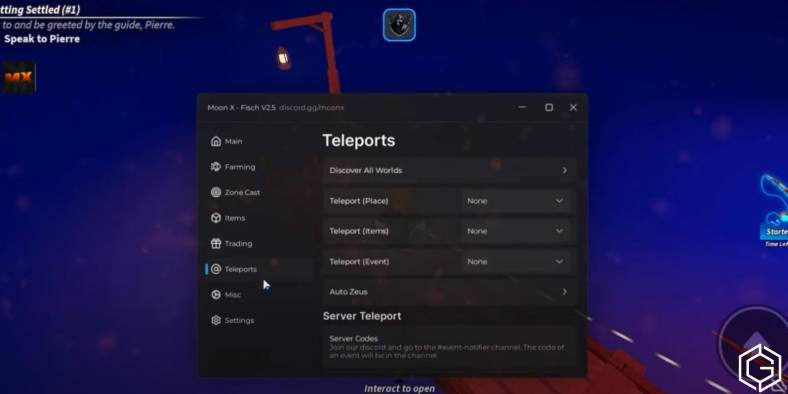
A Fisch Script is a Lua-based code that gives you access to powerful abilities like Auto Sell, Auto Farm, Auto Catch, and more in this experience. You can activate it through popular executors like Delta, Synapse X, KRNL, or Fluxus.
Once you run the script, it opens a GUI with all the features like Teleport, Auto Reel, Auto Catch, and Auto Cast. It gives you full control over Fisch, especially when you want to progress faster by automating manual tasks.
All Roblox Fisch Scripts
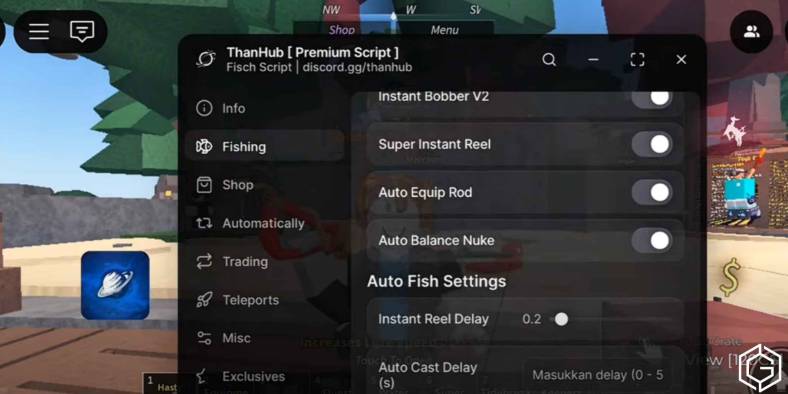
There are lots of Roblox Fisch Scripts, each having its unique features. So, here we have added the top ten Fisch Scripts below:
How Do You Use the Fisch Scripts?
To use a Fisch script, first, you will need to install a trusted executor like Delta, Synapse X, KRNL, or Fluxus. After completing the setup, open Roblox and join the Fisch experience where you want to activate the script.
Next, you need to inject the executor into your Roblox session and paste the Fisch Script code. When you click “Execute,” the GUI will load with options such as Auto Catch, Auto Reel, and Teleport. Below, we’ve also provided a step-by-step guide for you to follow.
- Step 1: Download an Executor like Synapse X, KRNL, or Fluxus. If your antivirus blocks it, temporarily disable the protection.
- Step 2: Wait for the installation to complete and unlock the executor using a key if required.
- Step 3: Launch Roblox and load into the Fisch experience.
- Step 4: Open the executor and click Inject to link it with Roblox.
- Step 5: Copy a trusted Fisch script and paste it into the executor window.
- Step 6: Click Execute to activate the script instantly in your game.
WARNING: If Roblox’s anti-exploit system flags you using a Fisch Script, you could face a temporary ban.
What Are the Features of Fisch Scripts?
These are the top features of Fisch Scripts that are commonly available across the latest script hubs:
| Feature | Description |
|---|---|
| Auto Fish | Automatically catches fish continuously without manual input. |
| Auto Cast | Automatically casts your fishing rod. |
| Auto Shake | Automatically completes the shake minigame without interaction. |
| Instant Reel | Instantly reels in fish to speed up the fishing process. |
| Auto Sell | Automatically sells your caught fish to earn money faster. |
| Teleport | Instantly travel to islands, NPCs, and fishing locations. |
| Auto Appraise | Automatically appraises fish. |
| Auto Enchant Rod | Automatically enchants your fishing rod. |
Is the Fisch Script Safe to Use?
There is no guarantee that any Fisch script is completely safe to use. Third-party developers create these scripts, which are not verified by the game’s developers. Moreover, running exploit scripts can expose your account to security risks, especially if downloaded from untrusted sources.
Additionally, using scripts violates Roblox’s Terms of Use and may result in account warnings or permanent bans if detected. Even if a script is advertised as “undetectable”, there is no assurance that it will remain safe after future game updates or anti-cheat improvements.
Is the Fisch Script Working?
As of October 3, 2026, the Fisch scripts are still working, though performance and compatibility can vary depending on the latest game updates. Since developers frequently patch exploits, a script that works today may stop functioning without warning.
That said, no exploit script is ever completely safe. Using scripts always carries a risk of account warnings or permanent bans. So, make sure to use them at your own risk.
Changelog
| Last Updated | Update History |
|---|---|
| October 3, 2026 | Checked and added 16 new scripts after extensive testing. These scripts are currently the best and are working as of October 3, 2026. |
| September 1, 2026 | Verified and added 15 new scripts after extensive testing. These scripts are currently the best and are working as of September 1, 2026. |
| August 10, 2026 | Added 18 new working scripts. All the scripts have been verified and are working as of August 10, 2026. |
| July 3, 2026 | Reviewed and verified all of the scripts listed above. At the time of this update, all existing scripts remain available and functional. |
| June 24, 2026 | Verified and added 13 new scripts. These scripts are currently the best and have been reported by users to be working. |
Frequently Asked Questions (FAQs)
It automates fishing, catching, reeling, selling, and teleporting, making you rich in Fisch without effort.
Yes, Roblox can detect scripts. Therefore, it is safer to use them in private servers only.
Auto Shake, Auto Cast, Auto Fish, Auto Sell, and Instant Reel are the most useful features.
Install a safe executor, join the game, inject it, paste the script, and press Execute.
They are safe only if downloaded from trusted sources and used with reliable executors.
Check out Pokémon GO: Cozy Companions Event Guide or Roblox Egor Script: No Key, Pastebin, Speed for more on Game Geek Fusion!
