
Close Menu
    Facebook X (Twitter) Instagram
    Facebook X (Twitter) Instagram
    Game Geek Fusion
    Login
    • Reviews
      8.5

      Mount & Blade 2: Bannerlord – Is it Worth Buying War Sails DLC?

      27 November 2025
      8.0

      House Of Legacy Review

      16 May 2025

      Soul Covenant Dev Diary Reveals That “Its True Appeal Lies Beyond The Action”

      17 July 2024
      10

      Miscrits Back Review: Finally Makes A Return

      17 July 2024
      9.0

      Dragon POW Review – A Complete Look

      1 June 2024
    • Guides

      Roblox Evomon Scripts: Auto Catch, Auto Battle, ESP (June 2026)

      27 June 2026

      Grow a Garden 2 Scripts: Auto Steal, Auto Plant, Keyless (June 2026)

      27 June 2026

      VV Ultimatum Scripts: Auto Parry, Dupe, God Mode (June 2026)

      27 June 2026

      Animal Hospital Class Tier List (June 2026)

      20 June 2026

      Universal Tower Defense Trait Tier List (June 2026)

      17 June 2026
    • Listicles
    • Comics
    • Codes
    • News

      Borderlands 4 Officially Priced at $70 – Randy Pitchford’s Drama Was for Nothing

      16 June 2025

      Wuthering Waves Reveals New Five-Star Character for 1.3 Update

      4 August 2024

      Minecraft Community Debates Overdue Visual Updates for Iconic Mobs

      4 August 2024

      Elden Ring Update Introduces Major Unannounced Nerf

      4 August 2024

      US DOJ Takes Legal Action Against TikTok

      4 August 2024
    Game Geek Fusion
    Home»Roblox
    Roblox

    Roblox Fake Lag Script: No Key, Pastebin, Egor (June 2026)

    Here's the latest Roblox Fake Lag Scripts to get you ahead of others!
    By Game Geek Fusion Staff16 September 20254 Mins Read
    Facebook Twitter Pinterest LinkedIn Tumblr Email
    Roblox Fake Lag Script
    Image by Game Geek Fusion
    Share
    Facebook Twitter LinkedIn Reddit WhatsApp
    Click Here to Add Game Geek Fusion as a Trusted Source!
    Add as preferred source on Google

    The scripts were last checked and updated on June 27, 2026.

    Quick Links▼

      Roblox is an online platform that hosts thousands of experiences that you can play. You can create your own experience and share it with others on the platform. You can use scripts to get an advantage over others in an experience.

      Roblox Fake Lag script is a fun script that injects Fake Lag into an experience. Your avatar will stutter and feel laggy when you activate this script, which adds a fun element. So, here’s a complete guide on the currently working Roblox Fake Lag scripts and how you can use them.

      Best Roblox Fake Lag Scripts
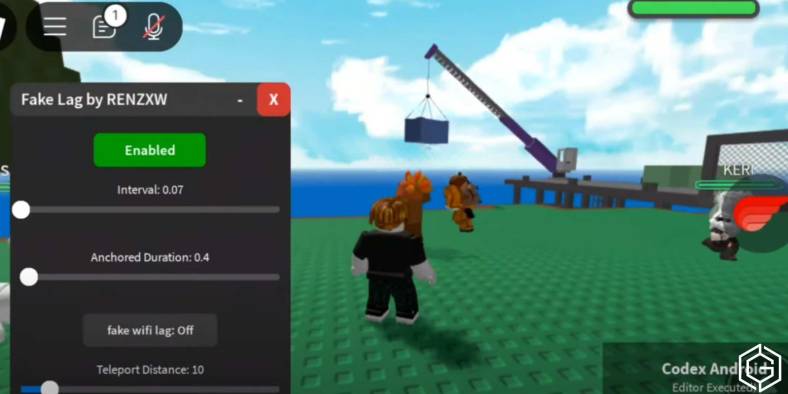
      Using Fake Lag Script in Roblox
      Screenshot by Game Geek Fusion

      Roblox Fake Lag Script – Draggable Toggle

      loadstring(game:HttpGet("https://raw.githubusercontent.com/Biem6ondo/FAKELAG/refs/heads/main/Fakelag"))()

      The above script adds a draggable on-screen button you can hold for five seconds to activate the Fake Lag. Toggle lag on or off at any time to create stuttered movement and desync effects, even while falling.

      FeatureEffects
      Draggable UI + ToggleMove the button anywhere and switch Fake Lag ON/OFF instantly.
      Hold to DeletePress and hold for ~5 seconds to remove the button safely.
      Works While FallingLag effect continues during jumps and falls for consistent memes.

      Roblox Fake Lag Script – Lightweight Mode

      loadstring(game:HttpGet("https://pastebin.com/raw/VM3b0Thg"))()

      The above script has simple, smooth pause/resume effects to simulate delayed movement for trolling or cinematic slow motion without cluttered GUI.

      FeatureEffects
      Quick ToggleEnable or disable lag behavior with minimal overhead.
      Smooth SlowdownApplies stuttered movement to mimic network delay.
      Low-Profile GUIClean interface that stays out of your way while playing.

      What Is A Roblox Fake Lag Script

      Roblox Fake Lag Script lets you turn any Roblox experience into a laggy environment. This script simulates a slow Internet user experience by slowing down your avatar’s movement while making animations run fast.

      This script features the “Lag Mode”, which has tons of meme features that you can try out in any Roblox experience with your friends. You can toggle “Lag Mode” on or off anytime you want.

      Key Features Of Roblox Fake Lag Script

      • Ultra Slow WalkSpeed (Walk like laggy)
      • Fast Animation Speed (Desync meme effect)
      • Forces run animation even when idle
      • Fully embedded, no external loadstring
      • Works on both PC and Mobile
      • Clean & transparent GUI with toggle
      • Smooth open animation & draggable panel

      How To Use Roblox Fake Lag Script
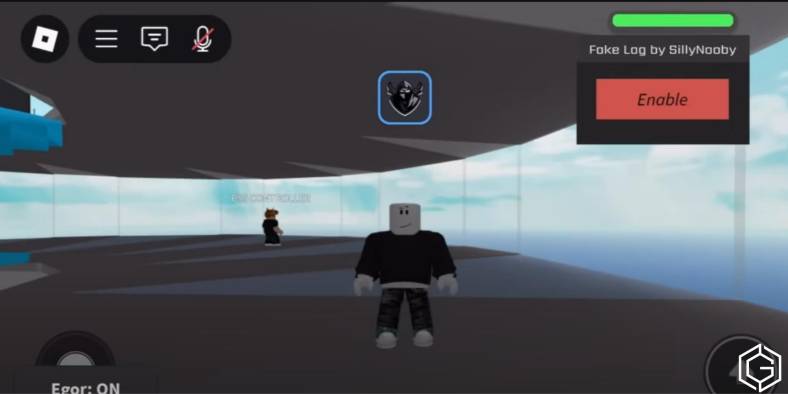
      Using Fake Lag Scripts in Roblox
      Screenshot by Game Geek Fusion

      To use a Roblox Fake Lag Script, you will need a script executor like Synapse X, Delta, KRNL, or Fluxus. After loading into the game, you have to open the executor, paste the script, and hit execute.

      The teleport system will activate, and you can either press a key, click, or enter coordinates to jump to specific locations. Remember that this script is only for fun or memes and it isn’t intended for competitive gameplay.

      Some games have anti-cheat systems that detect and block this script. You should always use updated, safe scripts and test them in private servers or alternate accounts before using them.

      If Roblox’s anti-exploit system flags you using a Fake Lag Script, you could face a temporary ban.

      Frequently Asked Questions (FAQs)

      1. What does the Roblox Fake Lag Script do?

      The Fake Lag Script creates a fake lag effect. It is a meme script that adds fun to any Roblox experience.

      2. Is Lag Mode useful in competitive games?

      No, it is not meant for serious gameplay. Lag Mode is designed purely for fun or memes.

      3. Can I use the Fake Lag Script on mobile?

      Yes. The Fake Lag Script works on both PC and mobile as long as your executor supports your device.

      4. What executor should I use for Fake Lag Script?

      You can use trusted script executors like Synapse X, KRNL, Delta, or Fluxus. Make sure to follow the setup instructions carefully for smooth script execution.

      5. Will I get banned for using the Fake Lag Script?

      It is possible. So, to stay safe, always test the Fake Lag Script in private servers or on an alternate account before trying it in public experiences.

      Check out Grow A Garden: All Fall Festival Shops or Grow A Garden: All Fall Seed Shop Seeds for more on Game Geek Fusion!
      Roblox Cover Image
      Roblox

      Sandbox, MMO, Social

      Release Date: 2006
      Platforms: Windows, macOS, iOS, Android, Xbox One
      Developer: Roblox Corporation
      Publisher: Roblox Corporation
      Game Geek Fusion Logo

      Roblox Script
      Game Geek Fusion Staff

        The Game Geek Fusion Staff Team is the heart and soul of GameGeekFusion.com. They love games. They love anime. This team comprises individuals with over 10+ years of gaming experience and at least 5 years of experience in Gaming Journalism. They strive to bring you the latest of what's happening in gaming and pop culture.

        Related Posts

        Roblox Evomon Scripts: Auto Catch, Auto Battle, ESP (June 2026)

        27 June 2026

        Grow a Garden 2 Scripts: Auto Steal, Auto Plant, Keyless (June 2026)

        27 June 2026
        Add A Comment

        Leave a ReplyCancel reply

        Latest Posts

        Roblox Evomon Scripts: Auto Catch, Auto Battle, ESP (June 2026)

        27 June 2026

        Grow a Garden 2 Scripts: Auto Steal, Auto Plant, Keyless (June 2026)

        27 June 2026

        VV Ultimatum Scripts: Auto Parry, Dupe, God Mode (June 2026)

        27 June 2026

        Animal Hospital Class Tier List (June 2026)

        20 June 2026
        Follow Us
        • Facebook
        • Twitter
        SUPPORT US – IT’S FREE

        Help GameGeekFusion reach more readers

        Set us as your preferred Google news source — takes one click, costs nothing.

        Set GameGeek Fusion as Google Preferred Source

        Your preferred sources appear more often in Google News & Discover

        Game Geek Fusion
        Facebook X (Twitter) Instagram YouTube RSS
        • Disclaimer
        • Terms of Service
        • About Us
        • Contact Us
        • Careers
        • Privacy and Cookie Policy

        Editorial Policy | Ethics Policy | Verification & Fact-Checking Policy | Diversity & Corrections Policy | Advertising & Affiliate Linking Policy

        All rights reserved. Copyright © 2026 GameGeekFusion.

        Type above and press Enter to search. Press Esc to cancel.

        Add as a preferred source on Google
        Add as preferred source on Google
        Ad Blocker Enabled!
        Ad Blocker Enabled!
        Our website is made possible by displaying online advertisements to our visitors. Please comply by disabling your Ad Blocker or support us directly.

        Sign In or Register

        Welcome Back!

        Login to your account below.

        Lost password?

        Loading Comments...

        You must be logged in to post a comment.